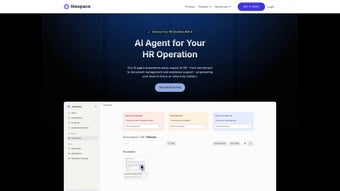

Download Litespace – Team Collaboration, Employee Engagement & Culture Analytics Software
Overview: Why Litespace Is the Modern Answer to Remote‑First Teamwork
In today’s hybrid‑work landscape, leaders are looking for a single platform that does more than just host video calls or file sharing. Litespace steps into that gap as a comprehensive web‑based solution that blends community‑building tools, analytics, and automated scheduling into one intuitive interface. The platform is built around the idea that strong relationships drive higher productivity, and it provides concrete mechanisms to nurture those relationships—whether teams are co‑located, fully remote, or anything in‑between.
What sets Litespace apart is its social‑network‑like environment where employees can join interest‑based community groups, participate in gamified team‑building activities, and celebrate milestones with built‑in recognition badges. At the same time, managers gain visibility into team dynamics through dashboards that surface engagement trends, collaboration patterns, and cultural health scores. This dual focus on human connection and data‑driven insight helps organizations create inclusive workplaces where every employee feels seen and valued.
Because Litespace runs entirely in the browser, there’s no heavy client install, and the service works on any operating system that supports a modern web browser—Windows, macOS, Linux, iOS, Android, and even Chrome OS. Security is baked in with end‑to‑end encryption, role‑based access controls, and compliance with GDPR and SOC 2 standards, making it a safe choice for enterprises of any size.
Beyond the core capabilities, Litespace continuously invests in research‑backed features such as AI‑driven sentiment alerts, which flag potential morale issues before they become systemic problems. The platform also offers multi‑language support, allowing global teams to collaborate in their native tongue while still maintaining a unified analytics view. Whether you’re a startup seeking to formalize your culture or a Fortune 500 looking for deeper insights into employee sentiment, Litespace offers a flexible, scalable foundation for building stronger teams.
Finally, the pricing model is designed to grow with your organization. A free‑trial period gives full access to every module, while tiered subscriptions let you add advanced analytics or premium support as needed. This pay‑as‑you‑grow approach ensures that you only invest in the tools that truly move the needle for your business.
Core Features That Turn Collaboration Into a Competitive Advantage
- Dynamic Community Groups: Create open or private groups around projects, hobbies, or DEI initiatives. Members can post updates, share files, and run polls, fostering a sense of belonging beyond day‑to‑day tasks.
- Gamified Team‑Building Activities: Choose from a library of ice‑breakers, virtual escape rooms, and skill‑based challenges that reward participation with points, leaderboards, and digital badges.
- Automated Scheduling Engine: Syncs with Google Calendar, Outlook, and Apple Calendar to propose meeting times that respect each participant’s time zone, preferred working hours, and availability patterns.
- Culture Analytics Dashboard: Real‑time visualizations of engagement scores, collaboration frequency, and sentiment analysis derived from chat and feedback data.
- Recognition & Rewards System: Managers and peers can award “Spotlight” badges, share kudos, and trigger small token rewards that integrate with popular HRIS platforms.
- Secure Knowledge Hub: A searchable repository for policies, best‑practice guides, and onboarding materials, complete with version control and access permissions.
- Integration Marketplace: Native connectors for Slack, Microsoft Teams, Asana, Jira, and Salesforce, allowing teams to bring Litespace data into existing workflows.
Each feature is designed to be modular; administrators can enable or disable components based on organizational needs. For example, a company focused on remote onboarding can prioritize the Knowledge Hub and Recognition System, while a product team might lean heavily on the Analytics Dashboard and Scheduling Engine. This flexibility ensures that Litespace can evolve alongside your business processes, rather than forcing you into a rigid workflow.
Beyond the listed capabilities, Litespace continuously rolls out updates that incorporate user feedback. Recent releases introduced AI‑driven sentiment alerts, allowing HR leaders to proactively address potential morale dips before they become systemic issues. The platform also supports custom branding, so the experience feels native to your corporate identity.
Another noteworthy addition is the “Pulse Survey” module, which lets managers launch short, anonymous surveys directly within the app. Results feed automatically into the Culture Analytics Dashboard, creating a feedback loop that drives continuous improvement. The module includes pre‑built question templates for topics such as work‑life balance, leadership effectiveness, and inclusion, saving time for HR teams that would otherwise craft surveys from scratch.
Finally, the mobile experience mirrors the web platform’s depth. On iOS and Android, users can receive push notifications for new recognition badges, upcoming meeting suggestions, or critical analytics alerts. The mobile UI is optimized for touch interaction, ensuring that remote workers who spend most of their day on smartphones never miss a beat.
Installation, Usage & Compatibility: Getting Started in Minutes
Step‑by‑Step Installation
Because Litespace is a SaaS solution, there is no traditional “install” process. The onboarding flow can be completed in three simple steps:
- Create Your Account: Visit Litespace.com, click “Start Free Trial,” and fill out the basic company information. You’ll receive a verification email to confirm ownership.
- Configure Your Domain & Security Settings: Add your corporate domain, set up SSO via SAML or OAuth (Google Workspace, Azure AD, Okta), and define role‑based permissions for admins, managers, and regular users.
- Invite Your Team: Upload a CSV of employee emails or integrate directly with your HRIS to automatically provision accounts. New users receive an invitation link that opens Litespace in any modern browser.
After the initial setup, an interactive walkthrough guides administrators through key configuration panels, such as enabling community groups, customizing the brand palette, and mapping calendar integrations. This guided tour reduces the learning curve and ensures that critical settings are not missed.
Daily Usage Workflow
Once logged in, users land on a customizable “Home Feed” that surfaces recent community posts, upcoming scheduled meetings, and personal recognition alerts. The left navigation bar provides quick access to:
- Community: Browse groups, start discussions, and view activity metrics.
- Schedule: View the AI‑suggested meeting calendar, propose new times, and accept invitations.
- Analytics (Managers Only): Dive into team health reports, export CSVs, and set alerts for engagement thresholds.
- Knowledge Hub: Search policies, upload resources, and track version history.
The platform’s responsive design ensures a seamless experience on desktops, tablets, and smartphones. For mobile‑only users, Litespace offers native iOS and Android apps that mirror the web UI, complete with push notifications for real‑time updates. Power users often create custom shortcuts using the “Quick Actions” bar, enabling one‑click access to frequently used features such as “Create New Poll” or “Launch Pulse Survey.”
Compatibility & System Requirements
Litespace runs on any operating system that supports the latest versions of Chrome, Edge, Firefox, or Safari. Minimum browser requirements are:
- Chrome 90+
- Edge 90+
- Firefox 88+
- Safari 14+
No plugins or Flash components are needed, and the service is hosted on AWS with a global CDN, guaranteeing low latency regardless of geographic location. For organizations with strict data residency policies, Litespace offers dedicated regional data centers in North America, Europe, and APAC. Additionally, the platform supports VPN‑only environments, ensuring that companies with heightened network security can still provide seamless access to their workforce.
Technical support teams recommend enabling browser caching for static assets and allowing outbound connections on ports 443 (HTTPS) and 80 (HTTP) to ensure optimal performance. For enterprises that require on‑premise proxy authentication, Litespace includes configurable proxy settings within the admin console.
Pros, Cons, Frequently Asked Questions & Final Verdict
Pros
- All‑in‑one solution that combines community building, scheduling, and analytics.
- Web‑based with native mobile apps, ensuring cross‑platform compatibility.
- Robust security with SSO, encryption, and compliance certifications (GDPR, SOC 2).
- Highly customizable—admin can enable only the features that matter.
- AI‑driven insights help leaders act on culture trends before they become problems.
- Extensive integration marketplace reduces siloed workflows.
Cons
- Pricing tiers may be steep for very small teams without a free‑forever plan.
- Learning curve for advanced analytics dashboards; may require brief training.
- Integration library, while growing, does not yet cover every niche third‑party tool.
- Some users report that the UI can feel dense when many modules are enabled simultaneously.
FAQ – Your Quick Reference Guide
Is there a free version of Litespace?
Litespace offers a 14‑day free trial with full feature access. After the trial, a “Starter” plan provides core community and scheduling tools at a low monthly cost, while advanced analytics require a “Professional” subscription.
Can Litespace integrate with my existing HRIS?
Yes. Litespace supports direct connectors for Workday, BambooHR, and SAP SuccessFactors. For other systems, a CSV import or API webhook can be used to sync employee data.
How does Litespace protect sensitive employee data?
All data is encrypted in transit (TLS 1.2+) and at rest (AES‑256). Role‑based access controls ensure users only see information pertinent to their role, and audit logs track every data‑access event.
Is Litespace suitable for large enterprises with multiple divisions?
Absolutely. The platform allows creation of hierarchical groups, division‑specific dashboards, and custom branding for each business unit, making it scalable from 10 to 10,000+ users.
What kind of support does Litespace provide?
Subscribers receive 24/7 email support, a dedicated account manager for Professional plans, and access to an online knowledge base, video tutorials, and community forums.
Conclusion: Should You Download Litespace Today?
If your organization is serious about moving beyond ad‑hoc chat tools toward a purposeful, data‑informed culture, Litespace offers a compelling package. The blend of community features, automated scheduling, and real‑time analytics creates a virtuous cycle: engaged employees collaborate more effectively, and leaders gain the insights needed to keep that engagement high. While the premium tier comes at a cost, the ROI manifests in reduced turnover, higher productivity, and a stronger employer brand—benefits that often outweigh the subscription fee.
Ready to experience a more connected workplace? Start your free trial now, and watch your team’s sense of belonging grow from day one.






